
Social Media Profile Receipt AI Photo Prompt (2026): 8 Instagram, YouTube, Facebook and Snapchat Receipt Ideas

The profile receipt trend turns your social media account into a shop-style paper receipt. A slightly crumpled white slip with zigzag edges shows a black-and-white portrait at the top, then your username, posts, followers and years active printed in typewriter text, finished with the platform logo, holographic stickers and a hand-drawn circle or arrow.
Upload one clear photo of yourself and fill in your own details where you see [brackets]. Every prompt keeps your face unchanged and tells the app to use only the numbers you give. They work in Gemini (Nano Banana), ChatGPT and Grok, with versions for Instagram, YouTube, Facebook, Snapchat, LinkedIn, creators and couples.
How to use these prompts
- Tap Copy Prompt under the receipt you like, or tap the ChatGPT, Gemini or Grok button to open the app with the prompt.
- Replace every [bracket] with your real username and numbers, then tap + and upload one clear photo of your face.
- Paste the prompt into the message box and send it.
- Zoom in and check every word and number. If something is wrong, reply with only the fix, for example “change FOLLOWERS to 12.4K”.
8 social media profile receipt prompts
Video tutorial: how to use these prompts
1. Instagram Receipt (Girls)
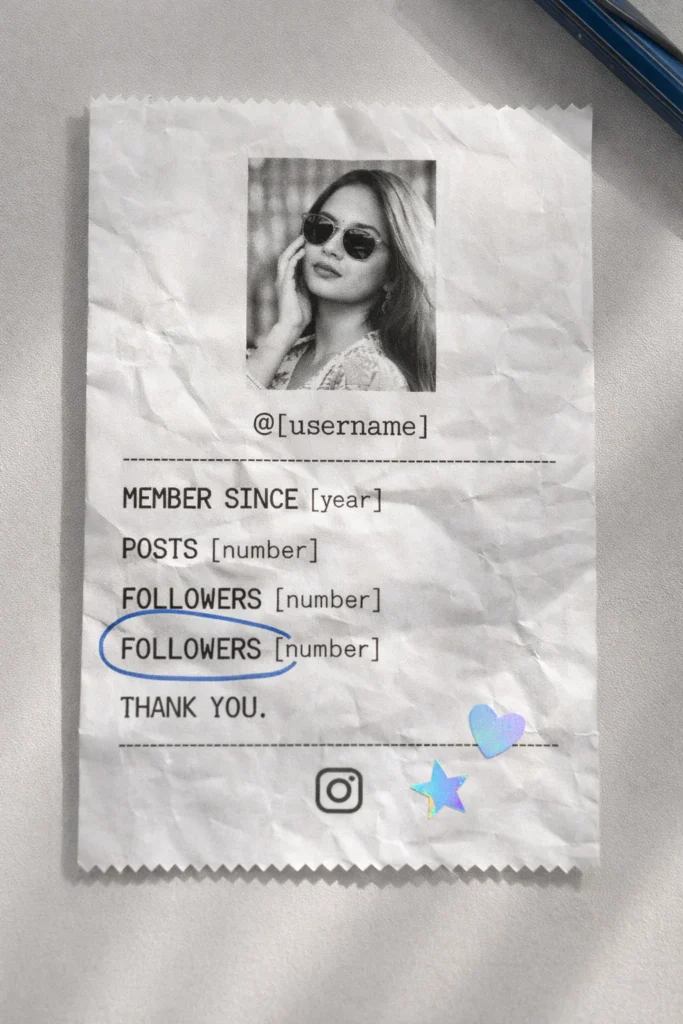
Use my uploaded photo and keep my face, features, skin tone and hairstyle exactly the same. Create a vertical 4:5 photorealistic slightly crumpled white paper receipt with zigzag edges on a light grey table, soft studio shadows. At the top, a black-and-white portrait of me wearing sunglasses. Below, sharp black typewriter text: @[username], MEMBER SINCE [year], POSTS [number], FOLLOWERS [number], FOLLOWING [number], THANK YOU. Add the Instagram logo at the bottom, holographic heart and star stickers and a blue pen circle around FOLLOWERS. Use only the details I give.
Tip: Replace every [bracket] with your real details before you send.
2. Instagram Receipt with Reels (Boys)
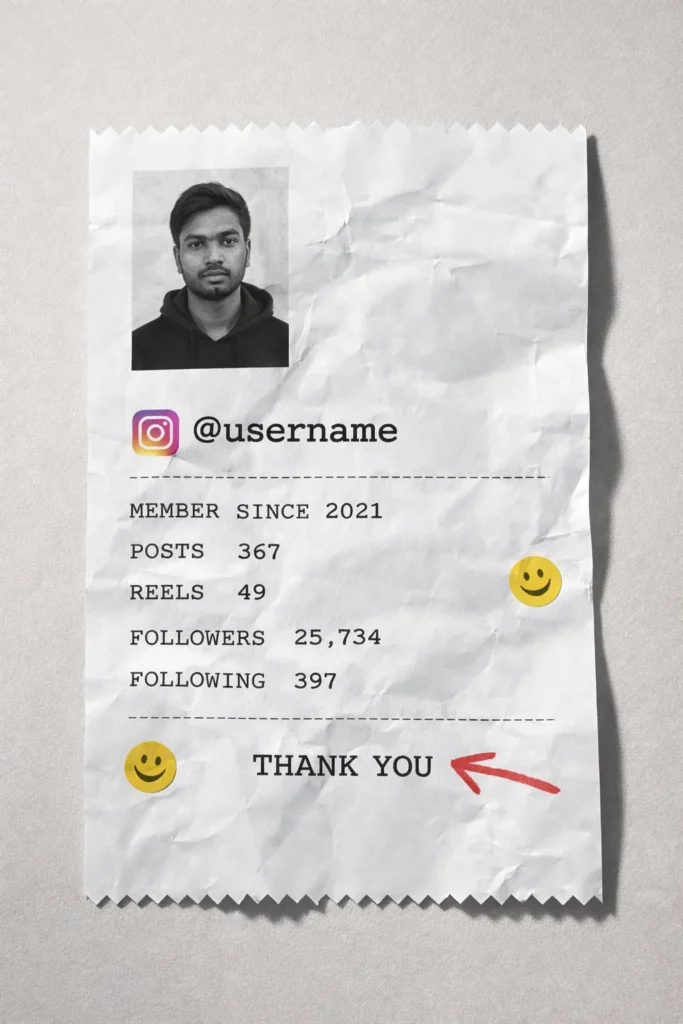
Use my uploaded photo and keep my face, features, skin tone and hairstyle exactly the same. Create a vertical 4:5 photorealistic slightly crumpled white paper receipt with zigzag edges on a light grey table, soft studio shadows. At the top, a black-and-white portrait of me in a black hoodie. Below, sharp black typewriter text: @[username], MEMBER SINCE [year], POSTS [number], REELS [number], FOLLOWERS [number], FOLLOWING [number], THANK YOU. Add the Instagram logo, smiley stickers and a red marker arrow pointing to THANK YOU. Use only the details I give.
3. YouTube Channel Receipt

Use my uploaded photo and keep my face, features, skin tone and hairstyle exactly the same. Create a vertical 4:5 photorealistic slightly crumpled white paper receipt with zigzag edges on a light grey table, soft studio shadows. At the top, a black-and-white portrait of me wearing headphones. Below, sharp black typewriter text: [channel name], CHANNEL STARTED [year], VIDEOS UPLOADED [number], SUBSCRIBERS [number], TOTAL VIEWS [number], THANK YOU FOR WATCHING. Add the YouTube logo, subtle red accents and a red pen circle around SUBSCRIBERS. Use only the details I give.
Tip: Round big numbers (18.2K, 1.4M) so they fit neatly on one line.
4. Facebook Profile Receipt

Use my uploaded photo and keep my face, features, skin tone and hairstyle exactly the same. Create a vertical 4:5 photorealistic slightly crumpled white paper receipt with zigzag edges on a light grey table, soft studio shadows. At the top, a black-and-white portrait of me with a warm smile. Below, sharp black typewriter text: [profile name], MEMBER SINCE [year], FRIENDS [number], FOLLOWERS [number], POSTS [number], THANK YOU FOR BEING HERE. Add the Facebook logo, blue accents, small blue doodles and a hand-drawn arrow. Use only the details I give.
5. Creator Receipt with Polaroid
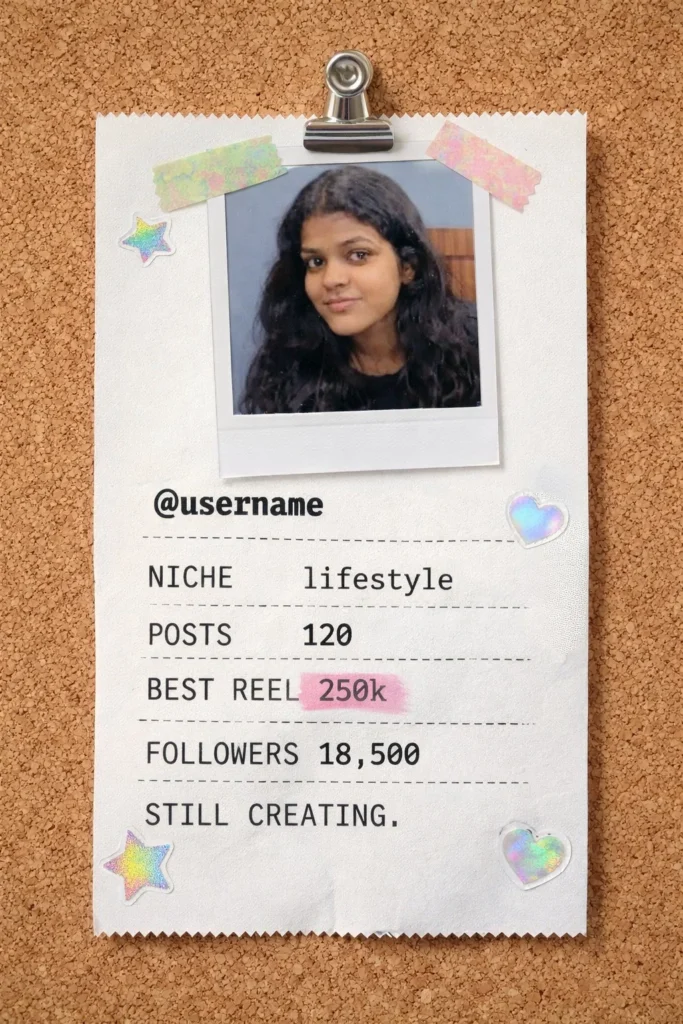
Use my uploaded photo and keep my face, features, skin tone and hairstyle exactly the same. Create a vertical 4:5 photorealistic white receipt with zigzag edges pinned to a cork board, a colour polaroid of me clipped at the top. Sharp black typewriter text: @[username], NICHE [topic], POSTS [number], BEST REEL [views], FOLLOWERS [number], STILL CREATING. Pastel washi tape, holographic stickers, a pink highlighter mark on BEST REEL. Use only the details I give.
Tip: Change NICHE to travel, food, fashion, tech or whatever you post about.
6. Snapchat Streak Receipt
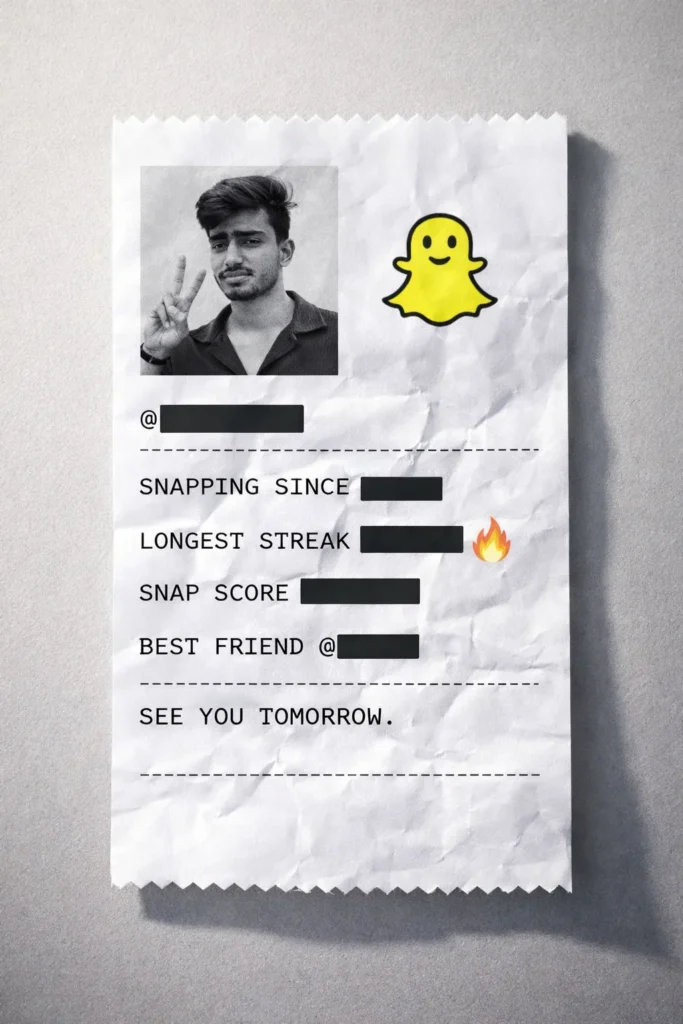
Use my uploaded photo and keep my face, features, skin tone and hairstyle exactly the same. Create a vertical 4:5 photorealistic slightly crumpled white paper receipt with zigzag edges on a light grey table, soft studio shadows. At the top, a black-and-white portrait of me making a peace sign. Below, sharp black typewriter text: @[username], SNAPPING SINCE [year], LONGEST STREAK [days], SNAP SCORE [number], BEST FRIEND @[name], SEE YOU TOMORROW. Add the Snapchat ghost, yellow accents and a fire doodle next to LONGEST STREAK. Use only the details I give.
7. Couple Account Receipt

Use the uploaded photo of the two of us and keep both faces, features and skin tones exactly the same. Create a vertical 4:5 photorealistic slightly crumpled white paper receipt with zigzag edges on a light grey table, soft studio shadows. At the top, a black-and-white portrait of us together. Below, sharp black typewriter text: @[couple username], TOGETHER SINCE [year], PHOTOS TOGETHER [number], TRIPS [number], FAVOURITE PLACE [place], STILL COUNTING. Add the Instagram logo, red heart stickers and a pen circle around TOGETHER SINCE. Use only the details we give.
Tip: Keep the playful lines short so the app spells them correctly.
8. LinkedIn Professional Receipt
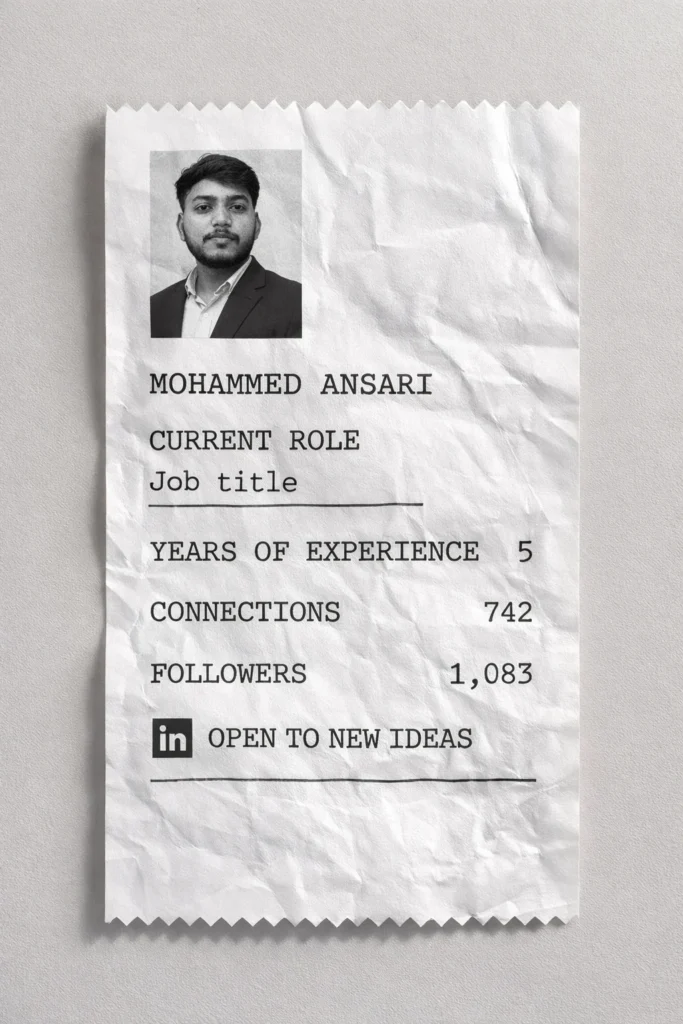
Use my uploaded photo and keep my face, features, skin tone and hairstyle exactly the same. Create a vertical 4:5 photorealistic slightly crumpled white paper receipt with zigzag edges on a light grey table, soft studio shadows. At the top, a black-and-white portrait of me in a navy blazer. Below, sharp black typewriter text: [full name], CURRENT ROLE [job title], YEARS OF EXPERIENCE [number], CONNECTIONS [number], FOLLOWERS [number], OPEN TO NEW IDEAS. Add the LinkedIn logo and a pen underline under CURRENT ROLE. Use only the details I give.
Design and colour ideas for profile receipt photos
The charm of this trend is the contrast between a plain paper slip and a few bright, playful details. Keep the receipt clean and let one accent colour do the work.
Classic black-and-white receipt
A monochrome portrait, black typewriter text and white paper on light grey is the original look. Sunglasses, a hoodie or headphones in the portrait give it personality.
Platform colour accents
Add a touch of the platform’s colour: pink and purple for Instagram, red for YouTube, blue for Facebook, yellow for Snapchat and navy for LinkedIn. One pen circle in that colour is enough.
Stickers, doodles and paper texture
Holographic hearts and stars, washi tape, a cork board, a coffee stain or a red marker arrow make the receipt feel handmade. Ask for realistic creases and shadows so it looks like a real photo.
Tips for better results
- Write your real numbers in the prompt; leave a line out rather than letting the app invent statistics.
- Keep labels short and in capitals, and round big numbers (12.4K, 1.2M); fewer characters means fewer typos.
- If the portrait does not look like you, reply: “Use my face exactly from the uploaded photo, keep it black and white.”
- Use 4:5 for a feed post or ask for 9:16 if you want it as a Story or WhatsApp status.
More Instagram trend prompts
See every trend in one place on our Instagram trend image prompts page. You may also like the three layer image prompt, the multiple poses AI photo prompt and the aesthetic mirror selfie prompt. For more looks, browse all girls, boys and couple prompts.
Frequently asked questions
What is a social media profile receipt photo?
It is an AI image that shows your account like a printed receipt: a black-and-white portrait, your username and key stats such as posts, followers or subscribers, the platform logo and a few stickers and doodles.
Do I have to show my real follower count?
You can show only the stats you are comfortable sharing and leave the rest out. If you post it about your own account, use your real numbers so your followers are not misled.
Why is the text on my receipt misspelled?
AI apps still make small text mistakes, especially with long words and many numbers. Shorten the labels, round the numbers and reply with a single correction instead of rewriting the whole prompt.
Are these profile receipt prompts free?
Yes. Every prompt here is free to copy, edit and reuse. The AI apps themselves may limit how many images you can create on their free plans.
More Instagram Trends prompts
 Chhath PujaChhath Puja Instagram Photo Prompts (2026): 8 Trending Aesthetic Looks for Gemini, ChatGPT and Grok
 Viral Aesthetic Mirror Selfie AI Photo Editing Prompt (2026): 8 Mirror Selfie Looks for Girls and Boys
 Viral Multiple Poses AI Photo Editing Prompt (2026): 8 One-Photo Pose Collage Ideas for Gemini, ChatGPT and Grok
 Instagram Viral Three Layer Image Prompt (2026): 8 Three-Panel Portrait Ideas for Girls and Boys